Showing posts with label exposure. Show all posts

Saturday, 27 August 2011

Exercise - Cloudy weather and rain

Cloudy weather can give some very interesting effects in the sky, but it can also alter the image considerably. While sunshine is pleasant and often thought of as being the best situation to take photographs in it can cause problems due to heavy shadows and lack of detail in the image.

Example 1.

Sun - ISO 100, f/6.3, 90mm efl, 1/200 sec


This image is taken in bright sunshine. It is generally pleasing but the shadow line across the exhausts distracts from the details.


Shade - ISO 125, f/9, 90mm efl, 1/60 sec


Here the whole of the exhausts are evenly lit without the distracting shadow line. There is about 3 stops of difference in the exposure, allowing for the slightly different ISO and f-number.This image is slightly bluer than the one taken in the sun.


Example 2.

Sun - ISO 160, 90mm efl, f/3.2, 1/2500 sec


This picture was taken in bright sunshine (in spite of the cloudy background). The sun reflecting off the metal rim of the hanger made getting a correct exposure difficult and you cannot see any detail inside the edge.


Shade - ISO 160, f/6.3, 90mm efl, 1/500sec


Here there is much more visible detail in the inside of the image (seen better in a larger pixel count), and the pattern of the metal hanger can be seen. There is about 3 stops of difference between the images.


Shade or sun? Both can be interesting. As in many things it depends on what the image is about.
Sun and shadows cause modelling and high relief but can obscure detail. In the pictures of the engine exhausts the shadow is distracting.
In the portrait shown in the manual bright sunshine is likely to have caused shadows to fall across the face and to have obscured the expressions. The flat light also contributes to the calm look, which fits with the overall theme of the photo.


Shade is Best!

The next part of the exercise is to look back at previous photographs and pick ones that benefited from shade.

Left Behind. ISO 100, f/5.6, 90mm efl, 1/100 sec


This picture was taken while walking along the coastal path on a dull day. The picture is the contrast between the regular patterns of the old tyre and the irregular shapes of the grass and flowers. If there had been the added complication of bands of shadow, or if the centre of the tyre curve had been in shade, it would not have been as effective. The absence of bright sunlight also contributed to my decision to do a monochrome conversion as I felt the patterns produced were enhanced this way.


Grieving. ISO 160, f/6, 90mm efl, 1/60 sec


In this picture of an old fashioned tombstone the main focus is on the face hidden beneath the cloak. If this had been taken in sunlight the face would have been very dark in contrast to the cloak, or if exposed for the face the cloak would have been burnt out.


Unwanted. ISO 100, f/11, 90mm efl, 1/80 sec


These old aircraft hangers show every detail of rust. If the day had been sunny they might have looked less dilapidated and unwanted. The mood was helped by the stormy clouds and the lack of sun.


 I then then took a variety of images deliberately in the shade.

Example 1.

Roots. ISO 400, f/5.6, 40mm efl, 1/13 sec


These densely tangled roots were taken from virtually under the tree. The light was poor anyway. If the sun had been shining shadows would have made the details in the roots less obvious.


 Example 2.
ISO 100, f/2.8, 90mm efl, 1/800sec


This was a very bright day but this flower head was in the shade of a glasshouse. The shade enabled me to take the finely detailed petals with an even light across the flower.


Example 3.

Curves. ISO 100, f/2.8, 90mm efl, 1/320 sec.


The even light shows the details in the old stonework and the different colours.


Rain.

Rain is a very common phenomenon in Scotland. Stopping taking pictures means that you loose well over half the available time, sometimes it feels like all the time. Pictures can be taken in the rain, looking at the rain, or after the rain looking at its effects.

Example 1.

Summer Rain.  ISO 100, f/2, 90mm efl, 1/160 sec


A sudden summer shower brings out the coloured umbrellas!


Example 2.

Gray Day. ISO 100, f/2.8, 90mm efl, 1/500 sec


This was taken 2 minutes after the previous one - but looking in the other direction. The mood purveyed is completely different, and exaggerated by the monochrome treatment .


Example 3.

Raindrops. ISO 400, f/13, 32mm efl, 1/25 sec.


Immediately after the rain has stopped, saturated petals on drooping flowers.


A Last Thought.

The other weather we see a lot of here is snow. This would make a whole subject in itself, as the light varies enormously, but the other day we were driving back up the A68 in brilliant sunshine and we stopped:

Sunny times. ISO 80, f/8, 1/125 sec.

Last year we were driving up the same road in February and stopped at the same lay by, the weather was slightly different:

Snow if Falling. ISO 100, f/5, 1/250 sec.

Learning points:
  1. Any weather is suitable for photography
  2. Sometimes shade gives you more detail 
  3. Think about what you are taking (this comes up time and time again)

Friday, 26 August 2011

Exercise - Higher and Lower Sensitivity 2

Having done the previous exercise I got curious and looked at my small (handbag sized) camera, I discovered that it had an incredibly high ISO range - so decided to experiment. All pictures were taken late evening, one after another, and without changing any settings other than ISO, and the consequent changes on shutter speed. All were handheld.

ISO 100, 1/4 sec.


This  is clearly very blurred as I cannot handhold at 1/4 sec.


ISO 400, 1/13 sec.


This is much sharper and shows no noticeable noise.


ISO 800, 1/30 sec.


This is beginning to show noise at 100%, although it is still usable.


ISO 1600, 1/60 sec


This shows marked noise at 100%, although would be usable at lower magnifications and small print sizes.


ISO 3200, 1/125 sec


Marked noise in all parts of the photo, useful as a record only, or when lighting conditions are so poor that there is no alternative.


ISO 64000, 1/200


Here the camera automatically switched from RAW (which I had been previously using ) to taking in jpeg, and also decreased the pixel size, changing from approx. 12 x 9 inches to approx.7 x 5 inches. The effect is that the image shows less noise than the previous image at a lower ISO.


ISO 12800, 1/400 sec.


Noise is starting to return significantly, and the colour is rather odd!


These images were taken on a small camera (Lumix Lx5), with a correspondingly small sensor. I was surprised how high I could push the ISO rating and still get a usable image, although probably not printable at any large size. This could be very useful in situations where I could not use a flash or tripod, but still needed an accurate record, the noise could also be digitally reduced, or might become an interesting part of the image in itself.

Thursday, 25 August 2011

Exercise - Higher and Lower Sensitivity

This exercise is to look at different ISO settings and how they effect image taking. A higher ISO equates to a higher sensitivity to light, which should make taking a handheld picture easier - but there is a payoff  in increased noise - which may make the picture unpleasant to look at.

Example 1.

ISO 100, f/5, 90mm efl, 1/10 sec.


This picture was handheld at the limits of my ability, it is not quite pin-sharp, although this hardly shows given the 'soft' look of the elephants covering.


ISO 400, f/7.1, 90 mm efl, 1/25


Increasing the ISO to 400 has meant the picture is sharper as it was taken at 1/25 sec, there is also a slightly greater depth of field.There is little increase in noise even when looked at at 100%.


 Example 2.

ISO 100, f/5.5, 70 mmefl, 1/10 sec


Here the picture is almost sharp (has not been sharpened digitally) and has a very low key effect, with little detail visible in the background.


ISO 400, f/5.5, 70 mmefl, 1/10 sec.


In this image the ISO has been increased to 400, while all the other settings have remained the same, the picture is much brighter, with more detail in the undergrowth, bur less mysterious, and I think less pleasing. The background areas do show some noise at 100%, with a degree of speckling.


Example 3.

ISO 125, f/2.5, 44 mm efl, 1/80 sec.


Here the low ISO was compensated for by a wide aperture, giving a very short depth of field, which did not include the candle and the glass (only the glass is sharp).


ISO 400, f/8, 44 mm efl, 1/25 sec


This time the higher ISO has allowed a lower aperture (helped by also a longer shutter speed) and the whole of the image is in focus. This would benefit from being cropped and lightened and possibly converted to monochrome.


Example 4.

ISO 100, f/3.3, 106 mm efl, 1/5 sec.


This picture of flowers at the wedding, was a failure at ISO 100 as the shutter speed was too slow and it is out of focus.


ISO 400, f/3.3,  106 mm efl, 1/20 sec


Increased ISO has allowed the shutter speed to be dropped enough to keep the flowers sharp. The already grainy background of the stones hides any noise from this increase.


Example 5.

ISO 100, f/2, 28 mm efl, 1/8 sec.


In the image everything is slightly out of focus. I was aiming to get the backs of the heads sharp, showing people waiting for the wedding to begin. Flash was not possible because of the distances invovled and the setting.


ISO 400, f/2, 28 mm efl, 1/25 sec.


This time the shutter speed was fast enough to show the effect I was after, concentrating on showing the people waiting. Unfortunately the actual image is less good as people have moved and the girl with a red jacket is not so visible!


Example 6.

ISO 100, f/2.9, 65 mm efl, 1/15 sec.


This image is much to dark. It could be lightened digitally. However to do this enough to see the detail in the dancer the contrast is altered and some image artifact occurs, with the colour looking unnatural.


ISO 400, f/2.9, 65 mm efl, 1/10 sec.


Here the statue is much lighter and the detail is visible, while the colour is maintained. Flash would have been possible but would have reflected off the shiny surfaces. There is slight noise visible in the black areas, but it is still more successful than over lightening the previous image. (using a tripod and a slower shutter speed would have been better still).

Tuesday, 23 August 2011

Exercise - Measuring Exposure 2

The idea behind this exercise is to look at exposure and exposure measurement and see if alternative exposure give a better (more interesting) image. You were supposed to take images at the measured exposure and then bracket with 1/2 the 1 stop changes either side of this. I altered this slightly as my camera auto-bracketing at 1/3 or 2/3 jumps, and the alteration for increasing/decreasing shutter speed and exposures also work in 2/3 jumps. As this is the main camera I use it seemed sensible to get used to the variations this would give me.

Example 1.

This is the platform at a local steam railway restoration project. The image was taken outside, but under the cover - so the light was limited.  (1/3 stop bracketing)


Average exposure
This is a rather bland image although it does show details in the roof.

Light


This exposure shows more detail in the roof without markedly overexposing the whole image.


Lightest


This shows even more detail in the roof - but the rest of the image is washed out.


Dark


Here the roof shows less detail - but the colours in the wall posters are more vibrant.


Darkest


Here the image is definitely underexposed.


These do not show a very large variation in the mid-range exposure.  The preferred exposure depends on the object of the image and which area of the photograph you want to emphasise. I prefer the 'Light' image as I like the detail in the roof and this shows it well without completely loosing the details in the walls. The camera light meter has had a degree of difficulty in getting an exposure that evenly balances light and dark because of the major contrast between the roof and the wall.

Example 2.

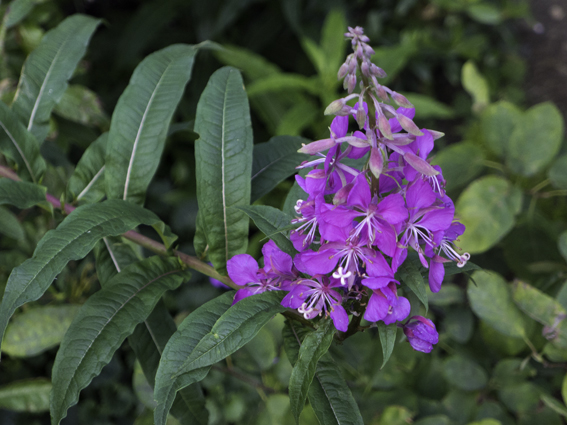
This is a simple landscape shot of stormy clouds with a foreground of wildflowers (mostly rosebay willowherb).  (2/3rds of a stop bracketing)

Average exposure.


Light


In the lighter image the foreground appears brighter, giving an impression of a sunnier day, but the interesting detail in the clouds is decreased.


Lightest


Here the whole image is washed out, and all detail and interest is lost.


Dark


Here the detail and the looming nature of the storm is well shown and there is still a reasonable degree of brightness in the foreground.


Darkest


This shows the best image of the storm clouds but the flowers and cornfield are definitely underexposed.


Again the 'ideal' exposure depends on the image required, a lighter look seems sunnier, while a darker look shows the clouds well. I prefer the ominous look of the approaching storm in the 'dark' image. I would prefer the clouds even darker as in the final image but without the underexposure of the foreground. This could have been achieved in camera by using a neutral grad filter, or in photoshop by either superimposing the 2 images and erasing the unwanted areas of one, or by duplicating one image and altering one copy with levels and then removing the unwanted areas of one of the layers. The cameras meter has given an acceptable  but  unexciting image in the average one.

Example 3.

This is again the local railway restoration project, but this is taken outside on a sunny day. (2/3 stop bracketing)

Signal Box.

Light


Here the lighter exposure shoes more detail in the signal box but the sky is starting to look washed out.


Lightest


This is definitely overexposed, all the interesting detail and colour in the sky is lost, and even the signal box looks in need of a lick of paint!


Dark


Here the sky still looks good, but the signal box and track are underexposed and lacking in detail.


Darkest


Here it is definitely underexposed and even the sky is starting to look unnatural.


In this outdoor image on a sunny day the camera's light meter has done a good job of averaging out the areas and the medium image is the most pleasing and balanced.

Example 4.

Looking over heather in the borders, lots of clouds and some sun, the camera tended to 'read' the exposure for the sky which gave a very dark view of the heather. When focused on the heather the sky was a whiteout. In the end I used the multi-area metering and managed to get it to pick up some of the heather and some of the sky. This would definitely been easier if I had a neutral grad filter on the camera! (2/3 stop bracketing).

Average exposure.


With an increased exposure the sky is lacking detail, but the heather does not actually show much of a change.


Lightest


Here the heather is finally showing some interesting detail and colour - but the sky is completely blown out.


Dark


 Here the sky looks interesting but the brightness in the heather is lost again.


Darkest


This time I must have caught a glimmer of sun on the heather, but the sky look almost unnaturally dark.


I am not very happy with any of these exposures - and didn't feel any of them gave the feel of the sunlight and storm that was actually present that day, so I played around a bit in Lightroom and came up with this.

Heather on the Hills
I repeated this exercise on several more occasions and came up with similar results.


Lessons learned.
  1. The camera's light meter does not always give the best result
  2. Think about the purpose of the image and expose for that
  3. Sometimes more than one exposure can give an interesting effect, and the one you think will be 'best ' might not be.